TL;DR: when teams patch a failing pipeline, rerun a backfill, or refresh a table in Databricks, they need to know what production services could be affected. Anyshift writes that production impact back into Databricks, so the action can continue with owner context instead of only data lineage.
Why Databricks Workflows Need Production Context
Databricks is where data teams govern tables, run pipelines, and build AI workflows on enterprise data. In this article, the Databricks side has four moving parts:
- Lakeflow is Databricks' pipeline system; here it refreshes the
checkout_featurestable. - Genie Code is Databricks' coding assistant; here it can propose the pipeline fix.
- Unity Catalog is Databricks' governance layer; it knows the table, permissions, and data lineage.
- The SQL Statement Execution API is the Databricks API Anyshift uses to write the impact report back into a Databricks table.
The missing context is production impact. When a Databricks workflow is about to patch a failing pipeline, rerun a backfill, refresh a dependent table, or call an Agent Bricks tool, Databricks knows the table, pipeline, notebook, SQL warehouse, model trace, and permissions. It does not automatically know which Kubernetes service consumes that table, which owner should approve, which monitor is already firing, or what else could break if the action runs.
Anyshift adds that missing production graph. In this workflow, Anyshift's annie do review step gathers live production context, renders a human-readable handoff, and writes the impact report back into Databricks through the SQL Statement Execution API.
The example is intentionally small: one Lakeflow failure, one impact table, and two production consumers. The value becomes clearer when the same pre-action review spans many Databricks workspaces, pipelines, feature tables, model endpoints, service owners, monitors, and agents.
A Stale Checkout Fraud Pipeline In Databricks
Example: a Databricks Lakeflow data pipeline that maintains checkout_features, the table used for checkout fraud scoring, is stale. Databricks sees a stale table and a failing pipeline. The likely next step is to patch the pipeline, then rerun the refresh.
Inside Databricks, that is a data-platform problem: a table is stale, a pipeline needs attention, and a governed workflow may be able to fix it.
In production, it is also a customer-path problem. The table feeds fraud scoring during checkout. If the fix is wrong, or if the backfill runs at the wrong time, the impact is not limited to the lakehouse.
The question before the action is simple: which production services, owners, monitors, and dependencies are in the path?
What Anyshift Adds To The Databricks View
For checkout_features, Anyshift maps the Databricks table and the pipeline that refreshes it to the production systems that depend on them:
checkout-api, owned bypayments-platform, consumesworkspace.default.checkout_featuresfor fraud scoring during checkout.risk-worker, owned byrisk, replays scoring jobs after feature freshness failures.checkout-playgroundis skipped because it is a non-production namespace.
The important relationship is not visible from Databricks lineage alone: Lakeflow pipeline -> Unity Catalog table -> checkout fraud features -> checkout-api Kubernetes deployment -> active checkout latency monitor -> payments-platform owner.
That is the production context a Databricks workflow needs before it patches the pipeline or reruns the backfill.
How Anyshift Writes Production Impact Back Into Databricks
The data engineer starts with a plain-English annie do request. annie do is Anyshift's reviewed workflow surface: it decides what production context is needed and writes it through the Databricks SQL Statement Execution API against a live Databricks SQL warehouse (SQL-optimized compute for querying data in Databricks).
Reviewed plan before writing impact to Databricks
Anyshift prepares the production context. Databricks SQL writes and verifies the rows.
- Check Databricks SQL API auth
- Create impact report table if needed
- Insert impacted services and owners
- Verify rows Databricks can read
The Databricks credentials stay local. The runbook requires DATABRICKS_HOST, DATABRICKS_TOKEN, and DATABRICKS_SQL_WAREHOUSE_ID.
Before Databricks continues with the pipeline fix, the generated review starts with production impact, not API mechanics:
From stale feature table to Databricks impact report
Anyshift adds production context before Databricks patches and reruns the Lakeflow pipeline.
This is the control point: the workflow can still continue, narrow scope, or require owner approval before the data pipeline rerun.
The Impact Report Inside Databricks
The workflow writes to the Databricks table workspace.default.anyshift_production_impact_reports.
Catalog Explorer (the Databricks UI for browsing governed data assets) shows the new table and schema. This screenshot is the table overview, not the row view.
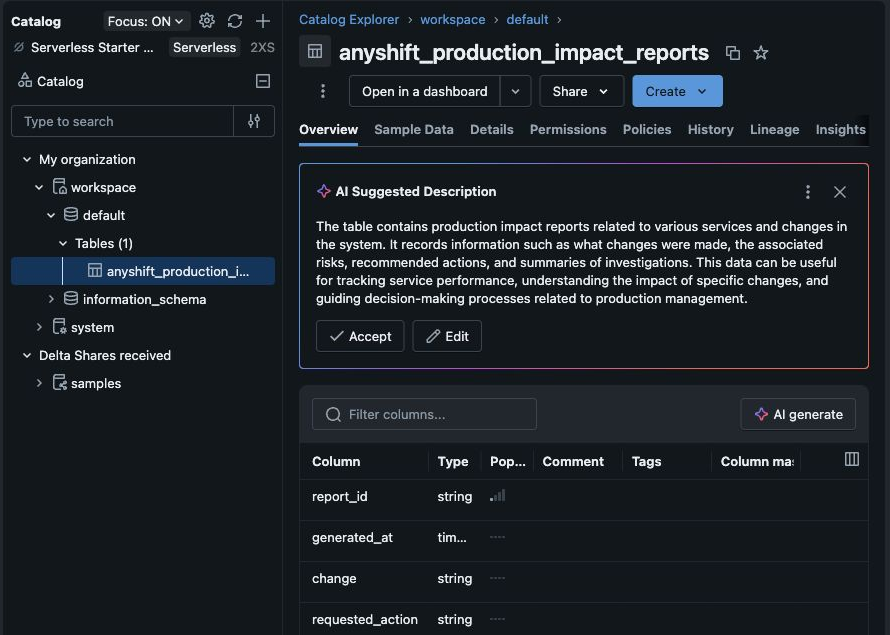
A separate verification query returned the two production impact records Databricks can use before the pipeline action. The screenshot proves the Databricks table exists; the query reads the rows inside that table:
| Databricks table shown above | Production row Databricks reads | Owner | Risk | Before the rerun |
|---|---|---|---|---|
anyshift_production_impact_reports | checkout-api | payments-platform | High | Require owner approval. |
anyshift_production_impact_reports | risk-worker | risk | Medium | Notify owner before backfill replay. |
Databricks workflows can now read production impact before continuing.
Why Databricks Lineage Misses Runtime Impact
Unity Catalog tells Databricks what data exists, how it is governed, and how data assets relate to each other. That is necessary.
It does not, by itself, tell the workflow that a table feeds the checkout-api Kubernetes service with an active latency alert, that a Terraform change touched the feature bucket policy, or that the payments-platform owner should approve before the rerun.
That is the boundary: Databricks lineage connects table -> model -> notebook/job. Anyshift's production graph connects table -> service -> runtime -> owner -> monitor -> blast radius.
Databricks governs the data and the agent. Anyshift gives the action production judgment.
What Data And Platform Teams Get
Data teams keep working in Databricks. Platform teams keep their production truth in Anyshift. The two meet at the moment a Databricks workflow needs to act.
Before a pipeline is patched, a backfill is rerun, a model endpoint is tuned, or an Agent Bricks tool call proceeds, Databricks can read:
- affected production services
- owners who should approve
- cloud and Kubernetes resources in the path
- unhealthy monitors and recent changes
- whether the action should proceed, narrow scope, or stop for review
For Databricks, the win is simple: governed data and AI workflows that also understand live production impact.
Next Databricks Integration Points
MLflow trace enrichment. Attach the Anyshift impact report to an MLflow agent trace, so the model or agent decision is evaluated with production context.
Unity AI Gateway guardrail. Make Anyshift a governed pre-action check in Unity AI Gateway, Databricks' control plane for LLMs, agents, MCP servers, and coding tools.
Agent Bricks tool. Expose Anyshift as the production-context tool an Agent Bricks agent calls when it needs to know what a data or workflow action could affect.
If your team uses Databricks and wants production-impact context before pipeline reruns, backfills, or agent tool calls, contact us.
