TL;DR
Latency rises on checkout-service-prod after a change to a shared ConfigMap. New Relic shows when the change happened, but the marker alone doesn't reveal which workloads depend on that configuration. Anyshift queries the production graph, finds eight affected workloads, and adds the reviewed impact to the New Relic Change Tracking event.
Why shared changes need production impact context
New Relic Change Tracking adds deployment and configuration markers to entity charts. When latency changes or errors rise, those markers help an SRE line up system behavior with recent changes.
Imagine that latency rises on checkout-service-prod after the ConfigMap update. The New Relic marker makes the timing visible, but the ConfigMap does not belong to a single service. The workflow still needs to identify every workload that consumes it.
With a normal application deployment, the team knows which service shipped. A shared ConfigMap, IAM policy, queue, or Terraform module is different: several workloads may depend on it even though none of those workloads had a new deployment. If the event describes only the component that changed, the team debugging a downstream symptom can miss the most relevant clue.
shared change
    ├── workload A
    ├── workload B
    ├── workload C
    └── five more workloads
This is the handoff Anyshift adds: calculate the production impact before asking New Relic to record the change.
1. Query Anyshift for the affected workloads
Anyshift builds a versioned graph of production resources and their relationships. The Anyshift Graph API makes that graph available to tools and pipelines through deterministic queries.
Take checkout-trace-app. During the review, the engineer knows which ConfigMap changed, but not which production workloads depend on it. With `annie graph query`, the engineer asks two read-only questions: Which ConfigMaps are shared across the checkout namespace? Which workloads and services depend on checkout-trace-app?
-- Rank shared ConfigMaps in the checkout namespace.
SELECT * FROM spof
WHERE kind = configmap
  AND namespace = checkout
LIMIT 10

-- Expand the selected ConfigMap into its production blast radius.
SELECT * FROM blast_radius
WHERE resource = checkout-trace-app
LIMIT 20
The first query ranks shared ConfigMaps by workload and pod fan-in. The second traces checkout-trace-app to the workloads and services in its blast radius.
Anyshift returns the affected workloads, the number of pods associated with each workload, and the downstream services in the same path. Here is the normalized output, with CLI transport metadata and the resource hash omitted:
{
  "intent": "blast",
  "elapsedMs": 53,
  "summary": "13 pods → 8 workloads, 7 services",
  "resolved": {
    "name": "checkout-trace-app",
    "type": "K8S_CONFIGMAP"
  },
  "blastRadius": {
    "pods": 13,
    "workloads": [
      { "name": "checkout-api", "affected": 4 },
      { "name": "api-gateway", "affected": 3 },
      { "name": "mobile-bff", "affected": 1 },
      { "name": "storefront-web", "affected": 1 },
      { "name": "payment-authorization", "affected": 1 },
      { "name": "cart-service", "affected": 1 },
      { "name": "catalog-api", "affected": 1 },
      { "name": "order-creation-worker", "affected": 1 }
    ],
    "services": [
      "checkout-api",
      "api-gateway",
      "storefront-web",
      "payment-authorization",
      "cart-service",
      "catalog-api",
      "order-creation-worker"
    ]
  }
}
This Graph Query returned the joined blast-radius result in 53 ms. In our live benchmark of unified production context, the comparable blast-radius task used 81.3% fewer model tokens than separate Kubernetes and AWS MCPs; across all six matched runs, the reduction averaged 83.5% per task.

2. Investigate in New Relic with graph impact
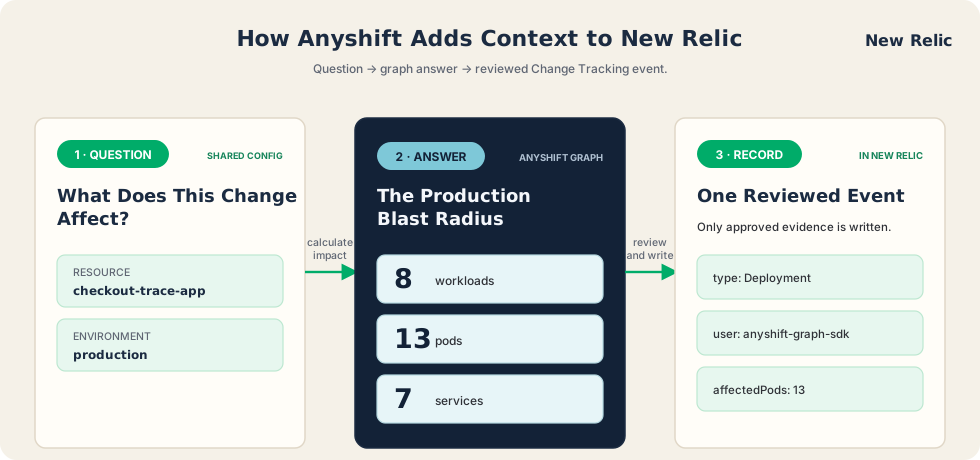
New Relic records the impact summary in the native Change Tracking event for checkout-service-prod, including the affected workload and pod counts plus the graph intent, while dependency names remain local. The Deployment marker now combines the time of the change with the production blast radius that Anyshift found. An engineer investigating the latency spike can see that the shared ConfigMap affected eight workloads and 13 pods, then use that scope to decide which services to inspect first.
The New Relic detail view shows that context beside the existing change metadata:

In the detail view, the affectedPods custom attribute shows that 13 pods were in scope. If several services degrade at the same time, the engineer has a concrete shared-change hypothesis and a clear scope for the investigation.
What else can you do with Anyshift and New Relic?
The ConfigMap example is one starting point. The same pattern can give other New Relic changes a clearer impact boundary, current SLO context, and an accountable owner. An engineer can run the questions directly with Graph Query:
SELECT * FROM spof
WHERE kind = serviceaccount
LIMIT 10

SELECT * FROM sharedconfig
WHERE resource = checkout-api

SELECT * FROM deploy_impact
WHERE target = checkout-api
  AND since = 24h
LIMIT 5

SELECT * FROM slo
WHERE target = 'checkout availability'

SELECT * FROM common_cause
WHERE namespace = checkout
  AND since = 2h
For applications, CI workflows, and internal tools, the Graph SDK capability guide provides typed helpers for the same questions.
These queries support several practical New Relic workflows:
- Review an identity change: find the workloads that rely on a ServiceAccount before changing its policy, then add the affected scope to the change record.
- Explain a rollout: record which downstream workloads may be affected, so an engineer can investigate beyond the service that deployed.
- Protect an SLO: capture whether an objective is healthy, at risk, or breaching when the change occurs.
- Prioritize alerts: identify which monitors and objectives sit inside the impact boundary before an incident spreads.
- Find a common cause: connect symptoms across services to the configuration, workload, or infrastructure they share.
- Route the investigation: resolve the application, repository, or team that owns an affected workload.
The SDK repository's `CAPABILITIES.md` is the source-of-truth matrix for typed helpers. The Annie CLI guide shows how to run deterministic Graph Queries from a terminal or CI workflow.
If your team uses New Relic and wants to test graph-aware Change Tracking on a real production dependency, bring us one case.